Syncing Names with Verification
warning
This guide is outdated.
Our guide for more in depth use of verification!
You may have noticed the need to set the nickname of your members to their username used in a third party service. Well, you're in luck! Our Verification Module can easily do this for supported services.
Setting up nicknames
First, you need to understand the basics:
- Words separated by dots (
.) inside double curly brackets ({{}}) are considered variables. - Variables consist of a root and value structured
root.value.
These variables are replaced by information stored for each unique user. For example, replacing the variable with a person's Roblox username will be written {{roblox.name}}, and anything left outside the curly brackets would be the same for everyone.
Some examples of correct and incorrect variables are:
roblox.name- This is incorrect, and will nickname everyone "roblox.name" when they verify.
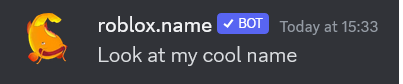
{{roblox.name}}- This is correct, and will nickname everyone their unique username when they verify.

{{member.display_name}} [{{roblox.name}}]- This is correct, and will nickname everyone first with their username, then their Roblox name afterwards within brackets.

Common variables
member.name- Unique name of the Discord membermember.display_name- Non-unique username of the Discord memberroblox.name- Connected Roblox account name, only available when Roblox is used for verification
Curly brackets in the nickname
This can be done simply by adding {{ "{" }} other stuff {{ "}" }}.