Discord | Get Custom Emoji ID's

· One min read
Rockoyhead
Monni Developer

Getting an Emoji ID is actually very easy, and useful to know how to do. ID's can only be gotten from custom made emojis.

  1. Start by heading to the the discord guild with the emoji's that you'd like to get the ID of. Now find a channel where you can chat.

  2. Type into the chat the backslash " \ " character.

  3. Now, just type the custom emoji you'd like right after it. The ID will appear to the rightmost part of your message.
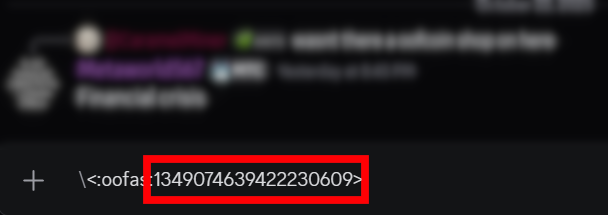
A custom emoji typed with a backslash in front of it, showing the emoji's ID in the message box You now have your Emoji ID! Use for all your niceties.

Point Rework & New Website

· 2 min read
Iraas
Monni Developer

After around 6 months of near daily development and hundreds of hours of total development time if not over a thousand. We are finally ready to release the new point update. This is the largest scale update we have ever done.

How to find a Discord Role ID

· 2 min read
Aszduh
Monni Developer

Using a role ID, you can do a few different things that may be necessary for a bot or integration to properly function, like interacting with Discord's API to assign certain roles to members. This guide will take you through the steps to quickly find a role ID!

Finding a Role ID​


Locating the role ID first requires turning on Discord's Developer Mode which enables options in menus that are primarily used to aid in working with the Discord API.

How to find a Discord Channel ID

· 2 min read
Aszduh
Monni Developer

Sometimes you may need to use the ID of a Discord channel to interact with Discord's API to, for instance, send messages through a bot or integration to a specific channel. With this guide, you can find the ID needed to perform these or any other actions you may need!

Finding a Channel ID​


Locating the channel ID first requires turning on Discord's Developer Mode which enables options in menus that are primarily used to aid in working with the Discord API.

Grow your Discord Server!

· 7 min read
Rockoyhead
Monni Developer

So you’ve made a server and everything looks good, but you’ve still got an issue.  It’s lonely here…

Luckily, you’ve stumbled upon this guide, so relax! I’ve compiled what I’ve learned to make it quick and easy for you to get rolling.

Note: It’s not as hard as you think once you know what to do!

These are usually the first things that come to mind when trying to expand your server. Platforms like Disboard are people’s go to’s. 

However, there are necessary steps to take before this can be effective. If you neglect these, you won’t see much growth, if any at all!

Adding New Languages To Monni

· 2 min read
Inkdog
Monni Developer

A simple guide on adding new translated languages to Monni!


To get started with translating, you'll want to register with an account with Weblate..

Once your account is made, your ready to start. Head to the folder named "Monni bot".

Here is our simple guide on adding a translation projects from English to (Your native language!):

How to find a Discord Guild ID

· 2 min read
Aszduh
Monni Developer

When troubleshooting problems it can be useful to know what server a problem is occurring in. One way to quickly locate a server is using the unique Guild ID given to each individual server.

Finding a Guild ID​


Locating the Guild ID first requires turning on Discord's Developer Mode which enables options in menus that are primarily used to aid in working with the Discord API.

Discord hierarchy explained

· 5 min read
Iraas
Monni Developer

Discord uses a hierarchy based permissions system for guild management. This is a powerful system, but the ability for hierarchies to overlap and overwrite each other creates a very complex and, at times, difficult-to-understand system. In the hierarchy, the position of a role matters. For example, kicking, banning, or changing roles cannot be done to a person higher than you in the hierarchy.

warning

Administrators can bypass every other hierarchy permission, except for affecting people higher in the hierarchy.

Common pitfalls​

Before we look at how the role hierarchy works in detail, let's go over a few common issues with the role hierarchy system.

Changing slash command permissions

· 3 min read
Iraas
Monni Developer

Discord has a built-in support for changing who and where slash commands and context menus can be used.

warning

In order to change permissions of commands you need to be an administrator of the server!

danger

Changing these settings isn't supported in the mobile versions of discord.

Changing permissions​

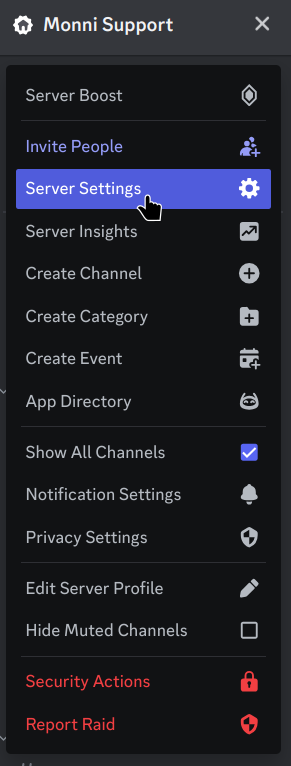
To get started head to server settings.

Server menu in Discord opened from the server name, with Server Settings selected

Discord Markdown

· 7 min read
Iraas
Monni Developer
Aszduh
Monni Developer

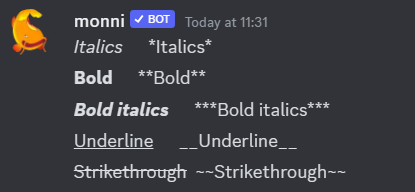
Discord has a built in markdown engine. Features of this engine range from typical markdown such as bold and italics to timestamps and code blocks.

Text Formatting​


InputResult
Italics*Italics* or _Italics_
Bold**Bold**
Bold italics***Bold italics***
Underline__Underline__
Strikethrough~~Strikethrough~~

Different text formatting styles can be combined. For example you can combine underline and italics with
*__underline and italics__*.

Discord message showing italics, bold, bold italics, underline and strikethrough next to the markdown that makes them